Enter the day.
Capture start times, finish times, breaks and the shift detail needed for each employee.
Working Hours is custom-built timesheet software for tracking employee start and finish times, overtime and pay calculations. Customise employee pay settings and keep audit-ready payroll records in one controlled workspace.
No credit card required — full access for 7 days.

Hours, pay and records in one place
Working Hours keeps daily time entry, customised employee pay settings, monthly totals and payroll-ready reporting together, so managers can work from one reliable source of truth.
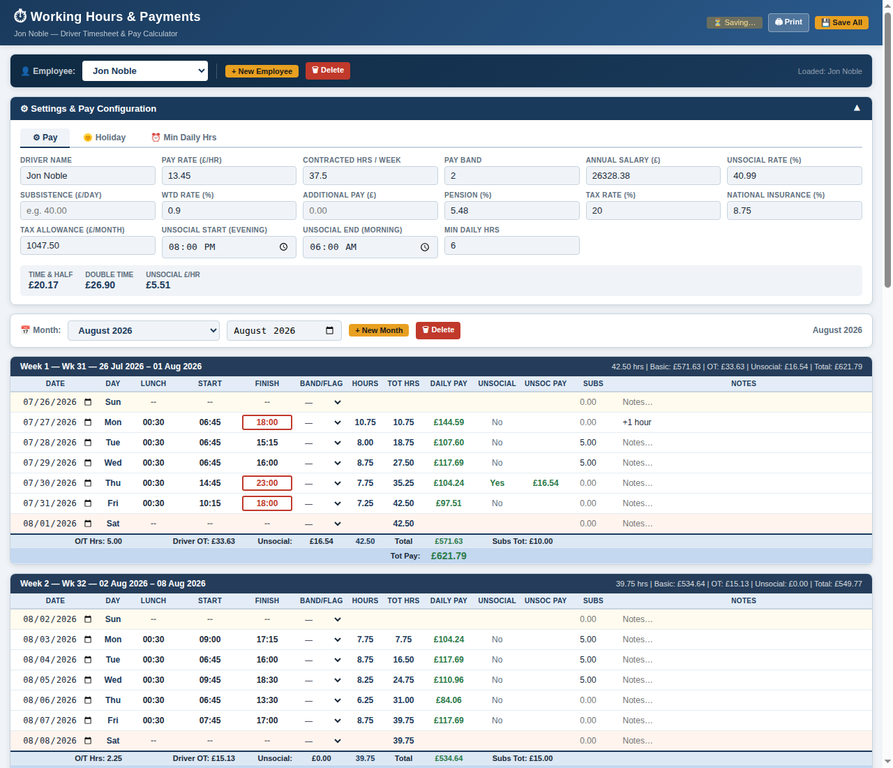
Capture start times, finish times, breaks and the shift detail needed for each employee.
Use employee-specific rates and configured pay rules to calculate ordinary hours, overtime and uplifts.
See daily calculations and monthly summaries before records are shared with payroll.
Print, save or export audit-ready timesheets without rebuilding the information elsewhere.
Make exceptions visible early
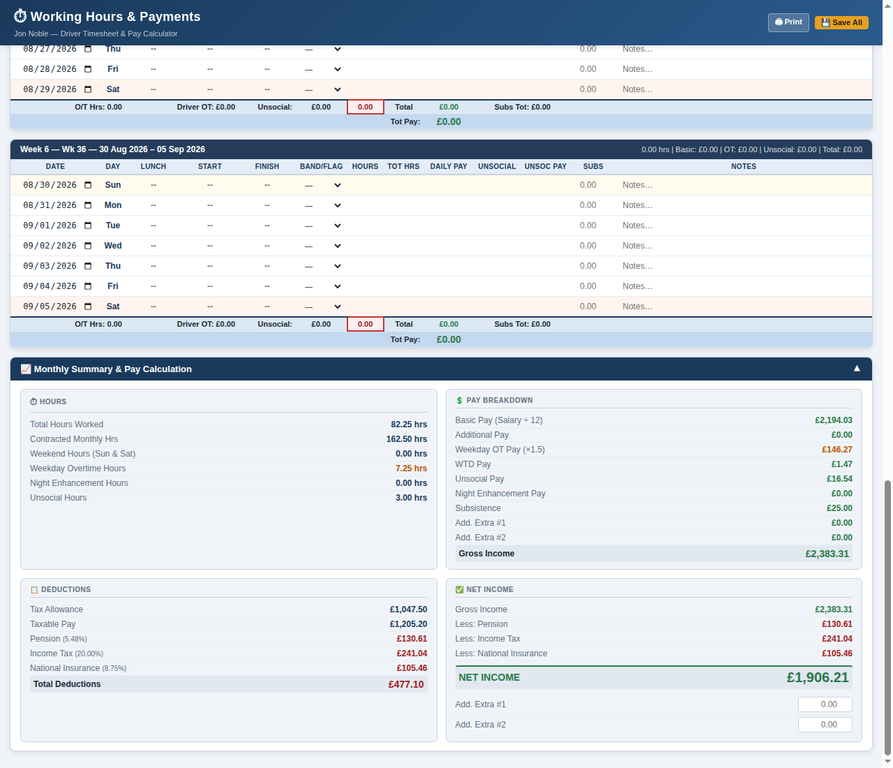
The monthly pay summary gives managers a clear view of recorded hours, calculated pay and deductions, making anomalies easier to review while the underlying employee timesheet remains available.
Capture start, finish and break times in a structured daily record for each employee.
Apply pay rates, overtime and unsocial-hours rules consistently across the monthly record.
Review pension, income tax and national insurance estimates alongside gross and net pay.
A dependable monthly routine
Working Hours supports a repeatable process for managers: customise pay settings, enter daily working hours, then review monthly figures without returning to spreadsheets or duplicate records.
Keep individual pay rates and settings with the employee record they belong to.
Enter the actual start, finish and break information as the work is completed.
Review totals, deductions and net pay from the same underlying timesheet record.
Useful at a glance
The Working Hours view brings time records and pay information together in a clean, readable format, supporting routine timesheet checks throughout the month rather than a last-minute payroll scramble.
Daily detail and monthly clarity
Daily timesheet entry keeps source data visible. The monthly summary turns that data into a clear pay and deductions view for managers and payroll review.
The control layer behind the timesheet
Working Hours keeps key configuration and review details accessible, so employee timesheets remain understandable, recoverable and suitable for payroll preparation.
Maintain individual employee names, pay configuration and the information used to calculate their records.
Set the values needed for ordinary hours, overtime and unsocial-hours calculations.
Review recorded hours, gross pay, deductions and net income in one controlled summary.
Save, print and retain clear working records to support payroll and audit requirements.
Records ready when they are needed
The completed timesheet can be reviewed as a clear monthly summary and retained as a printable, saveable record for payroll and operational administration.
Review total hours, gross pay, deductions and net income before the record is shared.
Create a clear working record for payroll review, management sign-off and audit support.
Keep the daily source information and its monthly summary together for future reference.
Working Hours
Bring daily timesheet records, customised employee pay settings and monthly payroll review into one controlled Working Hours workspace.
No credit card required — full access for 7 days.
The Working Hours guide covers employee setup, pay configuration, daily time entry, monthly summaries and audit-ready timesheets.